How to install Magento 2?

To install new Magento2 through following these steps –
Firstly you need to verify your prerequisites
- Apache 2.2 or 2.4 – to check your Apache version in ubuntu ‘apache2 -v’
- PHP 5.6.x or 5.5.x (PHP 5.4 is not supported) – to check php version ‘php -v’
- MySQL 5.6.x and upper – to check mysql -u -p
Once you meet the system requirements, install Magento software using command line.
- We need to ensure that the Composer is installed globally in your system. To check this typecomposer -help
if not installed then provide,
- curl -sS https://getcomposer.org/installer | sudo php mv composer.phar /usr/local/bin/composer
- Clone Magento2 from git
- Setting file system permissionchown -R :www-data .
then
- After cloning is complete, move to Magento2 folder cd <web-root>/magento2 then provide ‘composer install’.
- If sample data is not installed you can follow the following steps
a. Make a copy of composer.json
- cp composer.json composer.json.bak
b. Open composer.json and add “minimum-stability”: “beta”, before version.
- Then provide the following commandcomposer config repositories.magento composer http://packages.magento.com
- Next provide composer require magento/sample-data:1.0.0-beta
- Once above mentioned steps are complete, finally verify the installation by entering the base URL in the browser’s address. Now, you will be directed to the installation setup tool where you will be asked to enter the Database details and magento admin details.
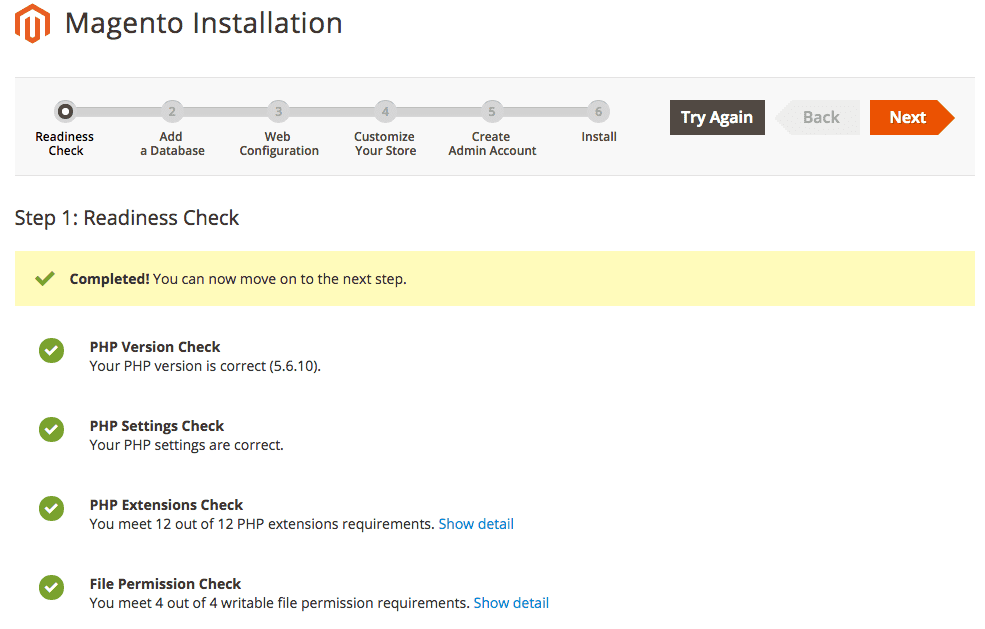
Note : During the Setup wizard if you are installing Magento2 in local system then make sure you provide the ip address instead of ‘localhost’.
Suppose if you install Magento2 with localhost and is not able to login to the admin side then you will have to make the following changes:
- Edit values of ‘web/unsecure/base_url’ &’web/secure/base_url’ in the table core_config_data by providing the IP address instead localhost
- Then clear cache in var/cache.
After these steps try to login, you will be able to login successfully.
Have a project concept in mind? Let's collaborate and bring your vision to life!
Connect with us & let’s start the journey
Share this article



Get in touch
Kickstart your project
with a free discovery session
Describe your idea, we explore, advise, and provide a detailed plan.